Delivered
Legacy deployment automation
Giving Informatica a real CI/CD path for the organization: Logic Apps and GitHub Actions driving the Informatica API to promote objects between environments, with automated remapping of the environment-specific IDs that made API-driven promotion hard.
- Context
- Automotive operations
- Period
- 2021
- My role
- Senior Data Engineer
- Stack
The problem
The data engineering team orchestrated ingestion and transformation in Informatica. Promoting an object between environments was cumbersome: export from one, log into the next, upload, remap environment-specific configuration, and occasionally edit the pipeline itself - all through the UI, per object. Informatica’s Git integration handled source control, but nothing about it produced a deployment pipeline; standard practice elsewhere - merge, checks, automatic promotion - simply did not map onto it.
The technical constraint that blocked naive automation: Informatica references objects by generated IDs, and those IDs differ across environments. The UI quietly resolves references when you upload an object. The API does not. Any automated promotion had to rewrite the XML definitions so every cross-reference pointed at the right object in the target environment.
The approach
I built the promotion pipeline around that constraint:
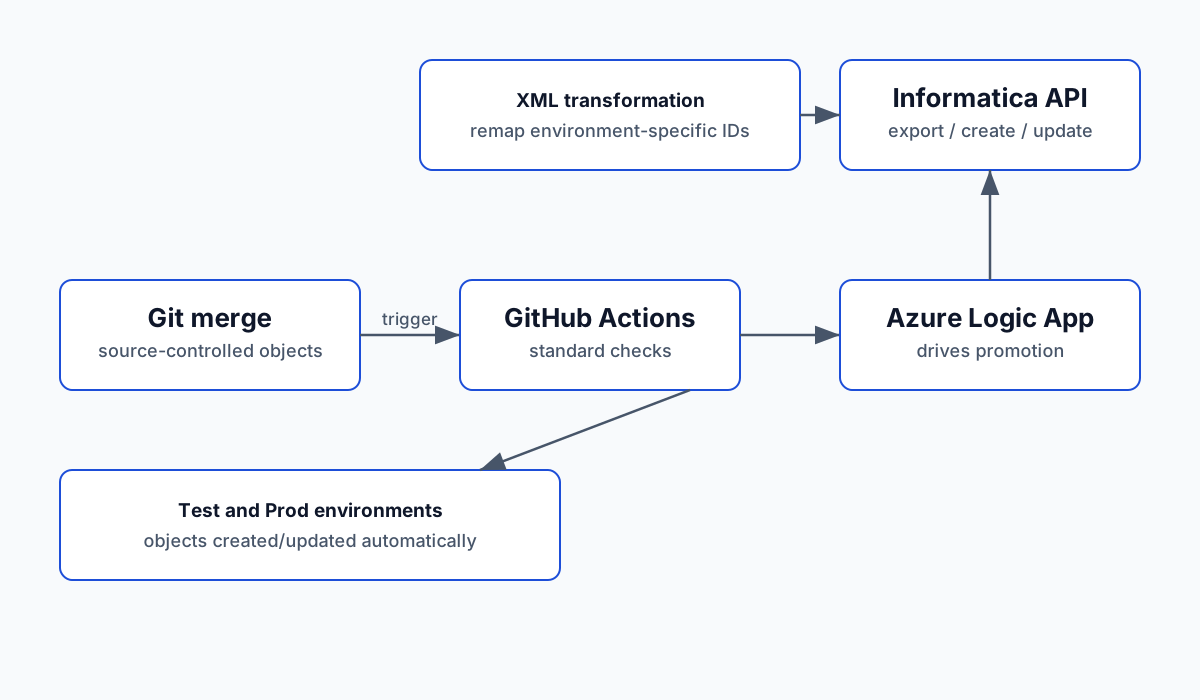
- Git as the trigger: merged changes in the repository, not a human with credentials, initiated promotion to test and production after the standard checks.
- Logic Apps + GitHub Actions as the drivers: an Azure Logic App, invoked from GitHub Actions, orchestrated the promotion sequence via the Informatica API - create or update objects in the target environment based on what merged.
- XML transformation for ID remapping: the hard center of the solution. Promotion exported object definitions, transformed the XML so environment-specific IDs resolved to the target environment’s objects, and submitted the remapped definitions. Getting this right for the full object graph was the bulk of the effort.
The outcome
Merged changes flowed to test and production environments automatically. Deployment stopped being a manual, error-prone UI procedure performed separately in each environment, and the practice of editing directly in test or production could end because promotion was faster than the workaround.
Tradeoffs and lessons
Automate the ugly part, not just the easy part. Calling the API to upload an object was the straightforward part. Remapping generated IDs inside the XML was the constraint that had kept this manual, and the pipeline was only real once it handled that.
The UI’s hidden behavior defines your API contract. Informatica’s upload flow silently fixes references; reproducing that behavior explicitly is what “as good as manual” required.
Legacy tools still benefit from modern practice. The value was not replacing Informatica - it was giving it the promotion discipline every other part of the stack already had.